An SSL certificate is the difference between “https://” and a red “Not Secure” warning in your visitors’ browsers. When Shopify shows “SSL Pending” next to your domain, it means the certificate is being issued but something is blocking it. In most cases, the culprit is a DNS misconfiguration or an active Cloudflare proxy that prevents Shopify from verifying your domain.
The fix is usually straightforward. This guide covers the 6 steps to resolve Shopify SSL pending, explains what causes it, and tells you what to expect at each stage so you are not guessing whether the process is working.
Shopify SSL pending means Shopify is still issuing your domain’s SSL certificate. Most cases resolve within 15 minutes to 24 hours after connecting a custom domain. If it is stuck, the most common fix is: (1) disable Cloudflare proxy (orange cloud), (2) confirm your DNS A record points to 23.227.38.65, and (3) set your domain as Primary in Settings > Domains. If it is not resolved after 48 hours, contact Shopify Support.
Shopify provides SSL certificates through Let’s Encrypt at no cost on every plan and renews them automatically every 90 days.
- SSL pending is a temporary state. Shopify provisions SSL via Let’s Encrypt and it normally activates within 15 minutes to 24 hours of domain connection.
- The most common 2026 cause is Cloudflare proxy mode (orange cloud) being active. Disable it while Shopify verifies your domain.
- Your DNS A record must point to Shopify’s IP: 23.227.38.65. Any other IP, or an AAAA (IPv6) record, blocks the SSL.
- Shopify does not support CAA records or multiple A records for a single domain. Remove them if present.
- SSL certificates on Shopify renew automatically every 90 days. You never need to renew them manually.
- If SSL is still pending after 48 hours, it is a server-side issue. Contact Shopify Support directly.
Free
SSL on every Shopify plan
90 days
Auto-renewal cycle via Let’s Encrypt
15–48 hrs
Typical time to activate after DNS setup
What is SSL?
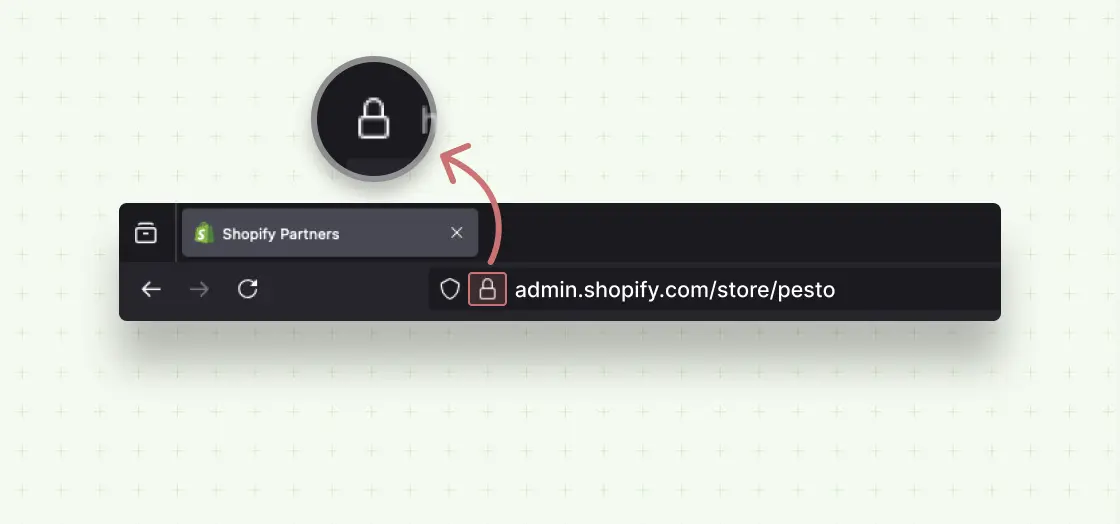
SSL (Secure Sockets Layer) is a security protocol that encrypts the connection between a visitor’s browser and your store’s server. When active, it shows “https://” before your domain name and a padlock icon in the browser address bar.
The modern standard is actually called TLS (Transport Layer Security). “SSL” is the legacy name that stuck. Shopify uses TLS 1.2 and TLS 1.3 for all stores. When people refer to an SSL certificate on Shopify, they mean a TLS certificate.
Shopify provides SSL certificates free on all plans through Let’s Encrypt, a nonprofit certificate authority trusted by every major browser. Certificates renew automatically every 90 days. You never need to buy, install, or manually renew an SSL certificate on Shopify.
Why SSL Matters for Your Shopify Store
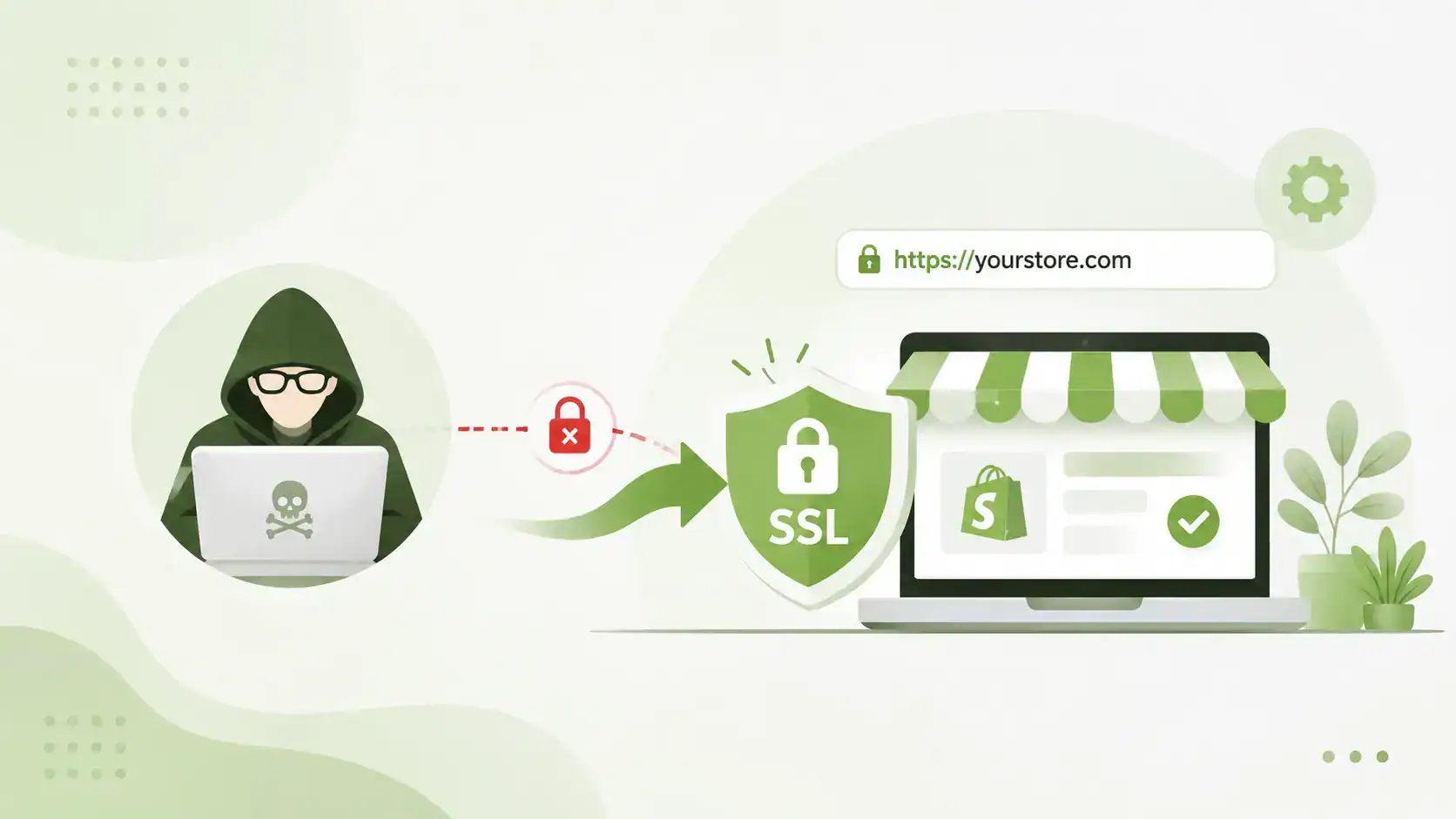
🔒 Protects Customer Data: SSL encrypts payment details, addresses, and login credentials in transit. Without it, this data is readable to anyone intercepting the connection.
⭐ Builds Buyer Trust: The padlock icon is a visual trust signal. Stores without it show a “Not Secure” warning in Chrome, Firefox, and Safari, which triggers immediate bounce for most shoppers.
📈 Improves SEO Rankings: Google uses HTTPS as a ranking signal. An active SSL certificate helps improve your Shopify store’s SEO visibility and drives organic traffic. Non-secure stores rank lower by default.
⚡ Enables HTTP/2 and Faster Load Times: HTTP/2 requires HTTPS, and HTTP/2 loads resources significantly faster than HTTP/1.1. SSL is a prerequisite for the speed improvements that help SEO and conversion rates.
🚫 Removes Browser Security Warnings: Without SSL, Chrome shows “Not Secure” in the address bar on every page, especially on forms and checkout. This warning alone reduces conversions by discouraging purchases.
What Does SSL Pending Mean on Shopify?
“SSL Pending” in Shopify’s domain settings means the platform has started the process of issuing a certificate for your domain but has not completed it yet. Shopify needs to verify that your domain actually points to Shopify’s servers before it can issue the certificate.
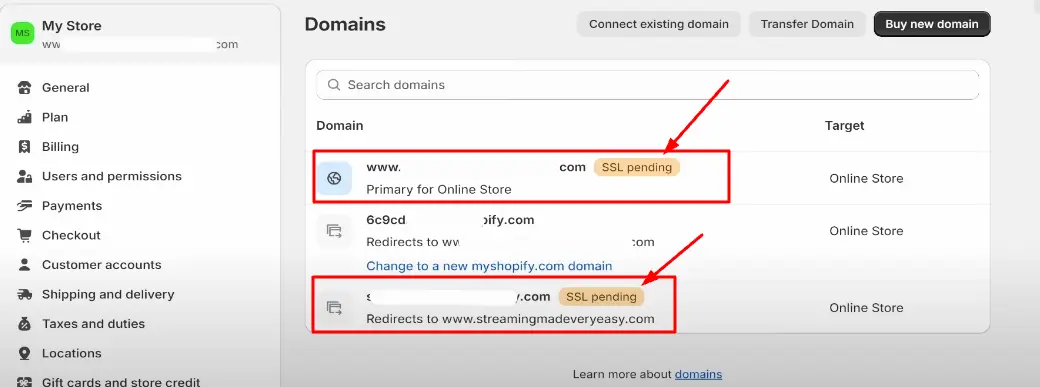
This is a normal temporary state when you first connect a custom domain. It typically resolves within 15 minutes to 24 hours. The key requirement is that your DNS records are correctly configured so Shopify can verify ownership.
Important: While SSL is pending, your store is still published and accessible via HTTP. Visitors browsing during this window will see the “Not Secure” browser warning. Do not take orders during an extended SSL pending period, as payment data is not protected.
There is a difference between “SSL Pending” and “SSL Unavailable.” SSL Pending means verification is in progress. SSL Unavailable means something is actively blocking the certificate from being issued, usually an incorrect DNS record, an active Cloudflare proxy, or a CAA record conflict.
Common Causes of Shopify SSL Pending
Cloudflare Proxy Active (Orange Cloud)
The most common cause in 2026. When Cloudflare proxies traffic, Shopify cannot verify your domain. Disable proxy mode while SSL activates.
Incorrect DNS Records
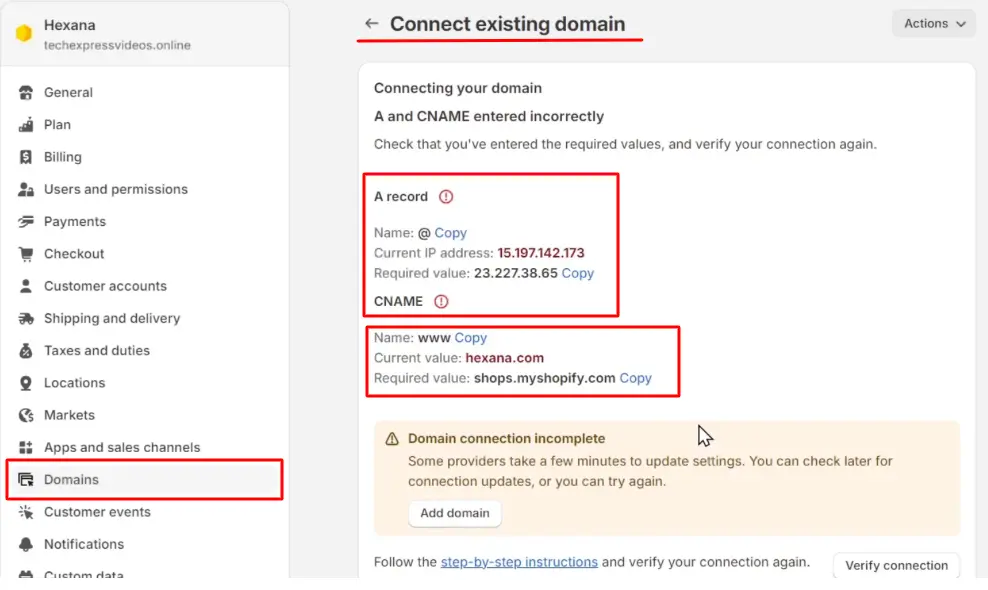
The A record does not point to 23.227.38.65, or the www CNAME does not point to shops.myshopify.com.
IPv6 (AAAA) Records Present
Shopify does not support AAAA records. Any IPv6 record on the same domain blocks HTTPS encryption.
CAA Records Blocking Issuance
CAA records restrict which certificate authorities can issue certificates. If present, they may block Let’s Encrypt from issuing to Shopify.
DNS Propagation in Progress
DNS changes take up to 48 hours to propagate worldwide. SSL cannot activate until propagation completes.
Multiple A Records
Only one A record should exist. Multiple A records create conflicts that prevent SSL activation.
Domain Not Set as Primary
SSL activates on the primary domain first. Set your preferred domain as Primary inside Shopify.
Shopify Server-Side Delay
Rare, but Shopify occasionally experiences provisioning delays during high traffic periods.
How to Fix Shopify SSL Pending: 6 Steps
Work through these steps in order. Most cases are resolved by Step 1 or Step 2. If you are past 48 hours with no resolution, skip to Step 6.
Step 1: Disable Cloudflare Proxy Mode Most Common Fix
If your domain uses Cloudflare, this is the most likely cause. In Cloudflare DNS settings, find the A record for your domain and click the orange cloud icon to turn it grey (DNS Only mode). The orange cloud means Cloudflare is proxying traffic, which prevents Shopify from verifying your domain for SSL issuance.
Once you switch to grey cloud (DNS Only), wait 15 to 30 minutes for Shopify to re-attempt verification. After SSL is active, you can re-enable Cloudflare proxy if needed, but you must use “Full (Strict)” SSL mode in Cloudflare to avoid redirect loops.
Step 2: Check and Fix DNS Records
Log in to your domain registrar (GoDaddy, Namecheap, Google Domains, or your DNS provider) and verify these records are set exactly as shown:
Step 3: Verify Domain Ownership and Set as Primary
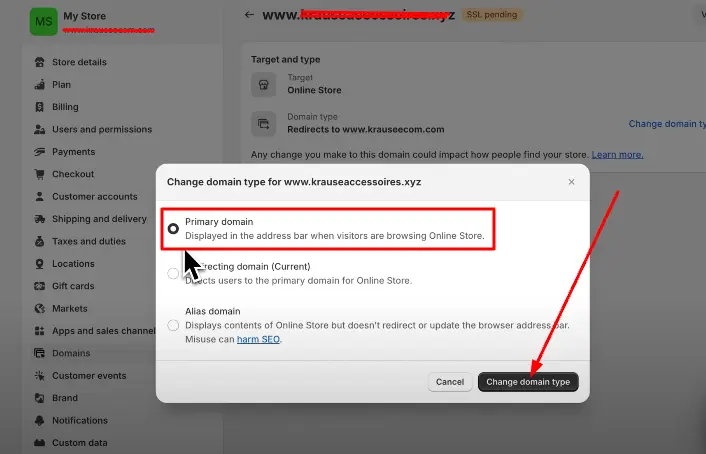
In your Shopify admin, go to Settings > Domains. Find the domain showing SSL Pending and confirm it is set as your Primary Domain. Shopify prioritizes SSL activation for the primary domain. If it is not set as primary, click the three-dot menu next to the domain and select Set as primary.
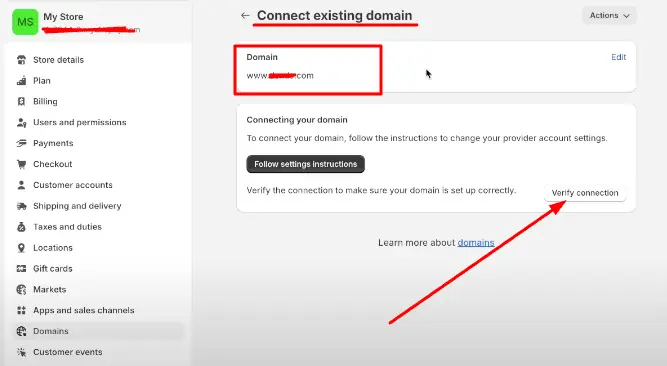
Also confirm the domain is listed under Online Store and not just as a redirect. If Shopify asks you to complete a verification step, follow the instructions in the prompt.
Step 4: Wait for DNS Propagation
After correcting DNS records, changes take time to propagate across global DNS servers. Shopify SSL typically activates within 15 minutes to 24 hours once DNS is correctly configured. In rare cases it can take up to 48 hours.
You can check propagation status using a tool like dnschecker.org or whatsmydns.net. Enter your domain and select the A record type. When most locations show 23.227.38.65, propagation is nearly complete and Shopify should issue the SSL shortly after.
2026 update: Let’s Encrypt implemented the ACME Renewal Information (ARI) standard in March 2026. This allows Shopify to distribute SSL renewals more efficiently at scale, reducing renewal-related SSL pending states that were more common in previous years.
Step 5: Clear Browser Cache and Check in Incognito Mode
If Shopify has already activated SSL but you still see “SSL Pending” or “Not Secure,” your browser may be serving cached data. Clear your cache and cookies, then check your domain status in an incognito or private window.
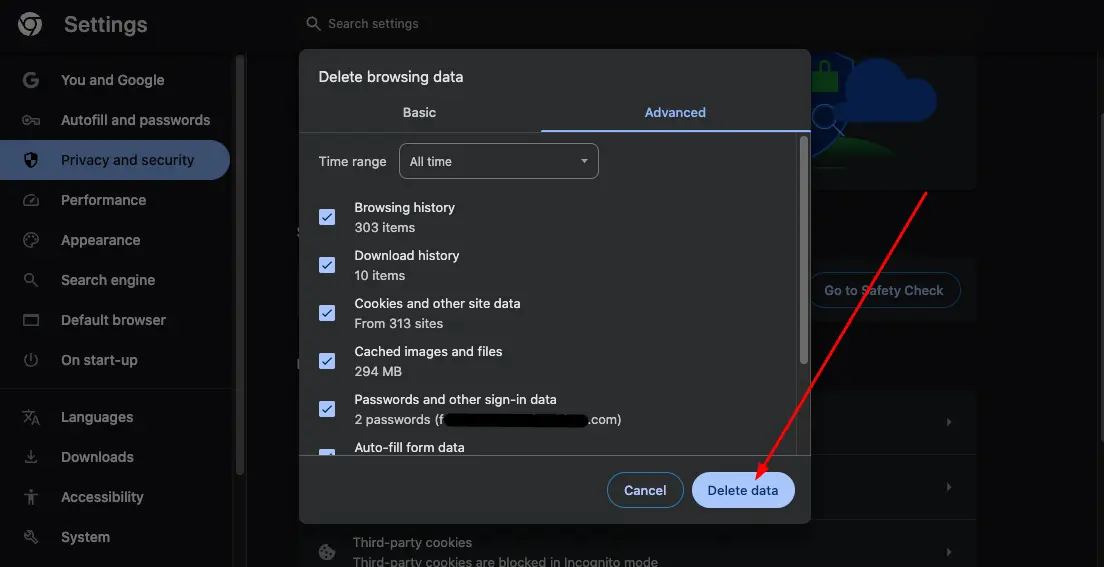
How to clear cache in Chrome
- Open Chrome and click the 3-dot menu in the top right corner.
- Go to More Tools > Clear Browsing Data (Windows) or Delete Browsing Data (Mac).
- Set time range to All Time.
- Check Cached images and files and Cookies and other site data.
- Click Clear Data and then check your store again.
Step 6: Contact Shopify Support
If SSL is still pending after 48 hours and you have confirmed that DNS is correctly configured, Cloudflare proxy is off, and there are no conflicting records, the issue is on Shopify’s side. Visit the Shopify Help Center and open a support ticket.
Before contacting support, check shopifystatus.com for any active incidents affecting SSL provisioning. If there is an active incident, wait for Shopify to resolve it before opening a ticket.
When you contact support, have ready: your store URL, your custom domain, a screenshot of your DNS records, and the time you connected the domain. Shopify support can manually trigger SSL provisioning if all DNS settings are confirmed correct.
How to Check SSL Pending Status on Shopify
There are two ways to check your SSL status, and it is worth checking both.
Method 1: Shopify Admin Panel
- Log in to your Shopify admin.
- Go to Settings > Domains.
- Find your custom domain. If SSL is pending, you will see “SSL Pending” or a yellow warning icon next to the domain name. If active, it shows “Connected” in green.

Method 2: Visit Your Store in a Browser
- Open your store’s custom domain in a browser (not the myshopify.com URL).
- Look at the address bar. A padlock icon means SSL is active.
- If you see “Not Secure” or a warning triangle, SSL is not yet active or there is a mixed content issue.
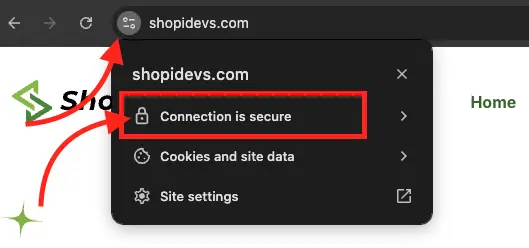
Check this in an incognito window to rule out cached results. If you see the padlock in incognito but not in your regular browser, clear your cache (Step 5 above).
Mixed content warning:
If you see a padlock with a warning sign, the SSL certificate is active but some page assets (images, scripts, or stylesheets) are still loading over HTTP. Update hardcoded HTTP links to HTTPS, or use protocol-relative URLs (//) to eliminate mixed content.
For more information about ecommerce security best practices, including what to do once SSL is active, see the full security guide. Once your store is secured, focus on Shopify store design to improve conversion rates, or explore free Shopify themes that are built with HTTPS-compatible asset loading.
Frequently Asked Questions
How long does Shopify SSL pending take?
Shopify SSL pending typically resolves within 15 minutes to 24 hours after you connect a custom domain with correctly configured DNS. In some cases it can take up to 48 hours. If it is still pending after 48 hours, there is an active issue blocking SSL issuance, usually an incorrect DNS record, a Cloudflare proxy conflict, or a server-side problem that requires Shopify Support to resolve.
Why is my Shopify SSL still pending after 48 hours?
The most common reasons SSL stays pending past 48 hours are: Cloudflare proxy (orange cloud) is still active on your domain, your A record does not point to 23.227.38.65, you have AAAA (IPv6) records or CAA records that are blocking Let’s Encrypt from issuing the certificate, or your domain is not set as Primary in Shopify. Work through Steps 1 to 3 above, then wait another 2 to 4 hours. If it is still pending, contact Shopify Support.
What is the difference between SSL Pending and SSL Unavailable on Shopify?
SSL Pending means the certificate is being provisioned and the process is ongoing. This is normal when you first connect a domain. SSL Unavailable means something is actively blocking the certificate from being issued, such as an incorrect DNS record, a conflicting AAAA or CAA record, or a Cloudflare proxy blocking Shopify’s domain verification. SSL Pending resolves on its own if DNS is correct. SSL Unavailable requires active troubleshooting.
Do I need to renew the SSL certificate on Shopify?
No. Shopify renews SSL certificates automatically every 90 days through Let’s Encrypt. You will never receive an expiry notice or need to manually trigger a renewal. In March 2026, Let’s Encrypt and Shopify implemented the ACME Renewal Information (ARI) standard, which makes automatic renewals at Shopify’s scale more reliable and better distributed.
Will fixing SSL affect my existing Shopify store setup?
No. Enabling SSL does not change your store’s content, product banners, theme, apps, or any other settings. It only changes the connection protocol from HTTP to HTTPS. After SSL activates, Shopify automatically redirects HTTP traffic to HTTPS so existing links and bookmarks still work. If you are making your Shopify store live for the first time, ensure SSL is active before announcing the launch or running paid ads.
Ready to Build a Fast, Secure Shopify Store?
Once your SSL is active, use ShopiDevs apps to add engaging content sections, product sliders, and image galleries. Trusted by thousands of Shopify merchants worldwide.

Jakaria is an SEO Content Writer in Shopify, Ecommerce, WordPress, and Tech Industry with 5+ years of experience. He specialises in developing engaging, helpful content by simplifying complex topics into an amazing story for B2B, SaaS, and Shopify businesses. He’s also passionate about staying updated on growth marketing strategies and Shopify trends.